


Flash memory costs create new ROI for embedded storage software
Rising NAND flash prices have doubled or tripled since late last year, fundamentally changing the economics of embedded storage design....
We are here to help
Have a question or need guidance? Whether you’re searching for resources or want to connect with an expert, we’ve got you covered. Use the search bar on the right to find what you need.


Heya folks, it’s Ned Pyle again. Let’s talk about how Tuxera Fusion SMB stacks up to its Linux community alternative, Samba. If you’re a cloud service provider, media & entertainment producer, data platform manufacturer, medical researcher, or system integrator, and you operate at enterprise scale, you need an enterprise file server. Fusion SMB is that server.
When I meet with customers about their SMB protocol needs, the first question is always:
Why should we buy Tuxera Fusion when Samba is free?
It’s a legitimate query. The answer is that Fusion SMB is an enterprise-class product for modern workloads. This is based on four pillars:

Fusion SMB implements the highest IO throughput for HPC, media production, and disaggregated app storage scenarios. Our SMB multichannel implementation brings superb network utilization when time is money, even on TCP networks. When combined with our RDMA support, it can’t be beaten; there is no RDMA in Samba.
For example, here is a Windows 11 client with a single 100Gb RDMA adapter performing the same large IO read workload to Fusion SMB and Samba, both run on the same server. Note the difference in throughput:
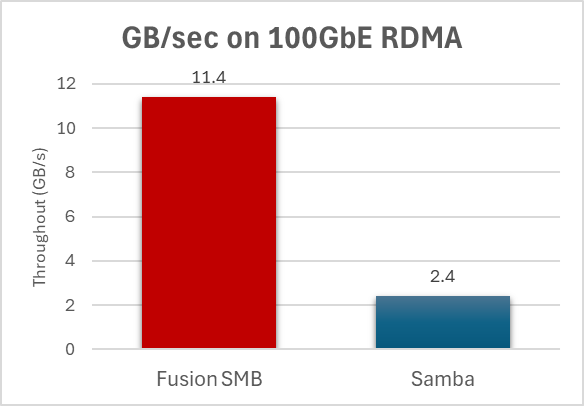
Imagine your remote file workloads running nearly 5 times faster and what that means to your productivity.
Modern workloads require exceptional reliability through scale-out clustering and persistent handles that can preserve ongoing IO even when a cluster node has died. Fusion SMB’s support of 32 nodes in a scale-out cluster, thousands of load-balanced containers in a hyperscale cloud service, and integration into custom high availability solution from data platforms makes it ideal for enterprises. Samba is limited to 4 node clusters and does not support scale out or persistent handles.
Performance at scale also means servicing thousands of simultaneous clients and tens of thousands of open files reliably. A file server cannot fall over under enterprise loads. Fusion SMB manages thousands of clients; Samba bottlenecks at a few hundred. More on this later.
Fusion SMB is a modern service built in the age of RDMA networking. 25 and 100Gb RoCEv2 networking have become standard equipment on servers, and 200, 400, or even 800Gb are available. Files keep getting larger, data sets keep growing. RDMA support means minimal CPU overhead, the lowest latency, and ensures your workload is king.
Giving Fusion more bandwidth means adding more performance. For example, in the test below I used 2x100Gbe network ports instead of one. Notice how Fusion SMB read performance nearly doubles while Samba stays nearly the same, even with both using SMB multichannel and having access to an entire extra 100Gb network. Fusion can use RDMA and scales linearly, whereas Samba is still on TCP and still bottlenecked.
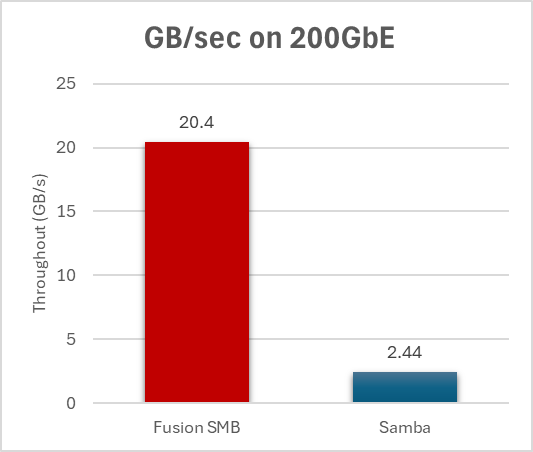
When you buy better hardware, your money is better spent.
Such massive bandwidth also means all-flash storage is now useful for file servers and offers tremendous performance. Fusion SMB supports guaranteed IOs on flash writes to protect your data – unlike Samba, which was designed for spinning hard disks and boosts its storage speeds by always buffering, raising the likelihood of data corruption and loss. Even when Samba is buffering and Fusion is guaranteeing direct IO data writes, Fusion still pushes data more than twice as fast. Note: the write speed here is limited in my tests by my old CPU cores, as I was using a RAMdrive that consumed serious System resources; paradoxically, you’d actually see much better on SSDs!
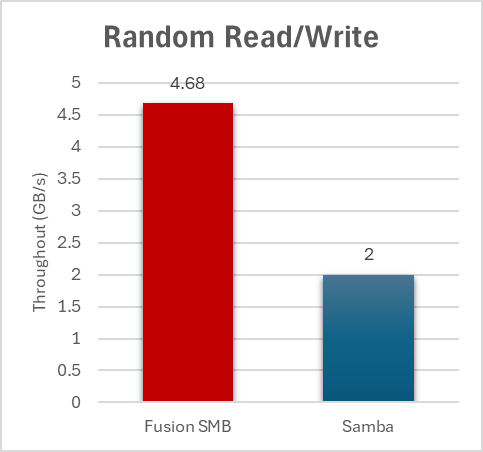
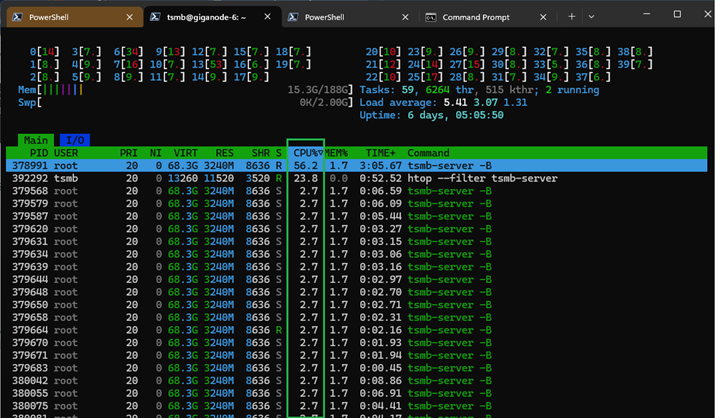
Fusion was built for SMB 3 scale, performance, and hardware from the ground up, not evolved from a much older codebase. This means a modern multithreaded architecture, not the legacy process-based approach of Samba that leads to bottlenecks in CPU, memory, throughput, and clients. In my final example, I have 16 Windows 11 clients sending a basic and realistic workload, 4K IOs to four files apiece, for a total of 64 files being randomly read and written. With Samba, we see every client is a full process taking 37.5% on average and that the total CPU utilization of this workload is 600.5% across all the cores.
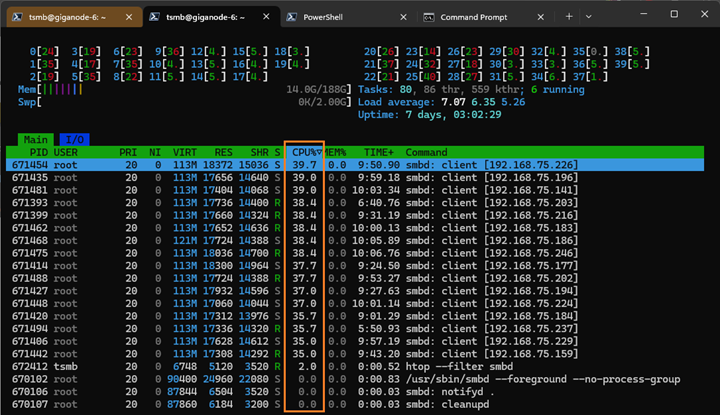
With Fusion SMB, it’s a single 56% process on a core with this workload and low usage threads spread out across the full set of cores, allowing much greater scale. The actual cumulative usage is half that of Samba for the same workload, and as more clients are added, Fusion will scale better. I only had 16 clients here but imagine 1,000… this is why our customers find that they can’t run more than a few hundred clients on their Samba servers: they simply run out of processors.
Tuxera also keeps Fusion state-of-the-art, offering the most capabilities and compatibility with Windows, macOS, and Linux SMB clients. As we’ve said before, these innovations are key: workloads continue to increase the size and rate of data changes, while making higher reliability and integrity demands of the infrastructure, in the never-ending quest for higher productivity.
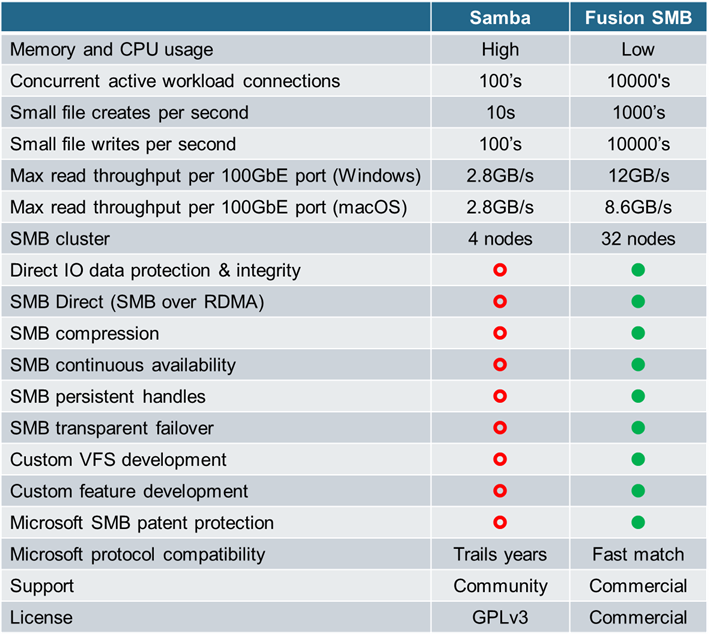
Fusion SMB has dedicated support engineers for your critical production workloads, available to assist you at any time and with contractual guarantees. Those support engineers are Tuxera employees, not outsourced contractors and generalists. If a bug is found, they have direct access to the developers to generate a hotfix or update the next maintenance release. With Samba, support is a mailing list. Samba commercial support is provided by paid third parties. Your mileage will vary.
Furthermore, if you want new features or customizations in Samba, you must either convince the open-source community, pay for one of those third parties, or build them yourself. With Fusion SMB, we will collaborate with you through a contract and agreed upon requirements and results to meet your specific needs. For instance, we have made features for our partners like VFS modules, diagnostics, reporting, auditing formats, cluster behaviors, and management tooling. They had specific workload needs, and we met them.
For Samba to scale to large enterprise workloads requires you to make time and monetary investments. Management of processes across cores to minimize impact on your other running workloads. Purchasing more cores to ensure there is enough compute for that process load. When a server reaches its eventual CPU bottleneck, that means buying additional servers, which means more energy consumption, more heat management, more IT management, more network switch consumption, more rack usage. It’s a horizontal solution and those simply cost more.
One last thing: it’s important to state that Samba is not a bad product and that’s not the point of this article! In the world of small and medium business, low client load home folder scenarios, and consumer storage devices, it should absolutely be your first choice; it would be mine! This article seeks to explain Tuxera Fusion SMB as a solution for the enterprise cloud service provider, media & entertainment producer, data platform manufacturer, medical researcher, and system integrator. You should always use the right tool for the job at hand.
Until next time,
Ned Pyle, Enterprise Storage Technical Officer, Tuxera
Find out more about Tuxera Fusion SMB on the product page.
RELATED ARTICLES

Rising NAND flash prices have doubled or tripled since late last year, fundamentally changing the economics of embedded storage design....

Heya folks, it’s Ned Pyle again. Last year I talked about how Fusion SMB stacks up to Samba in enterprise workloads. If you run or integrate cloud, machine learning, media & entertainment, or HPC services, Fusion SMB is the right choice for Linux file servers. But...

Tuxera, the award-winning global leader in quality-assured file systems and storage management solutions, is expanding its reach in Korea with Ocube taking...

Insights from the DPP Leaders’ Briefing The DPP Leaders’ Briefing in London brought together senior leaders from across the media...
Suggested content for: