


Fusion SMB instead of Samba: Why?
Heya folks, it’s Ned Pyle again. Let’s talk about how Tuxera Fusion SMB stacks up to its Linux community alternative, Samba....
We are here to help
Have a question or need guidance? Whether you’re searching for resources or want to connect with an expert, we’ve got you covered. Use the search bar on the right to find what you need.


Heya folks, it’s Ned Pyle again. Last year I talked about how Fusion SMB stacks up to Samba in enterprise workloads. If you run or integrate cloud, machine learning, media & entertainment, or HPC services, Fusion SMB is the right choice for Linux file servers.
But what about Windows Server? After all, Microsoft created SMB 3 and should have the best solution, right? I led that engineering effort for 12 years in Puget Sound and I know Windows’ limits better than most. Let’s see how Fusion beats Microsoft at its own game for scale, performance, security, and customer scenarios.

The Windows SMB server is a kernel mode driver and scales well; I’ve seen servers with many thousands of client connections. In one memorable org, admins created a share for each user in the company, with 50,000 shares hosted on a single server.
But there are other scalability factors that have little to do with the SMB service.
Windows Server supports two enterprise file systems: NTFS and ReFS. NTFS is the general purpose file system released in 1993, while ReFS shipped in 2012 and was designed for application workloads like Hyper-V. Microsoft has updated NTFS over the years for trends like larger file sizes.
But it’s not kept pace with the industry. For example, the Windows Volume Shadow Copy Service (VSS) is the snapshot mechanism for backups and it only supports 64TB volumes, a small number in 2026. The equivalent Linux Logical Volume Manager (LVM) snapshots are not limited in size, have differential and thin-provisioned options, and support copy on write and merge options. IBM Storage Scale’s GPFS volumes can be 633,825 yottabytes – if there was enough storage hardware on Earth to make use of it – and include options like file block dehydration into tape. ZFS brings snapshot cloning and online healing. XFS is much faster at raw IO than NTFS on the exact same hardware.
Linux file systems are just more capable of scaling modern file server workloads than Windows.
Both Windows SMB server and Fusion SMB support scale-out clustering. But modern Windows Server uses Storage Spaces Direct (S2D), limiting clusters to 16 nodes. More nodes would allow greater aggregateperformance, but it’s not allowed.
The supported hardware for a Windows Server cluster is also constrained by the cluster validator tool and Windows Server Catalog’s OEM partners. S2D also requires Windows Server Datacenter edition, whichcosts six times the price of the Standard edition license for the same number of cores. This is before you pay for Windows Server CALs.
A Fusion SMB server cluster is not so bound. With Corosync and Pacemaker, we support up to 32 nodes. Our HPC and cloud partners have built their own clustering technology, or utilize Kubernetes clustering, andhave vastly exceeded these numbers using Fusion. Tuxera supports them all. And if your hardware supports your Linux distro, so do we. Fusion SMB pricing doesn’t penalize you for more cores nor does it have CALs.
Raw client-server performance is where your organization wins the battle of productivity: time spent transferring data is time spent wasting money. Whether using modern RDMA networking or legacy TCP, you want the best possible perf for applications and users. Let’s see Windows SMB server and Fusion SMB go head-to-head:
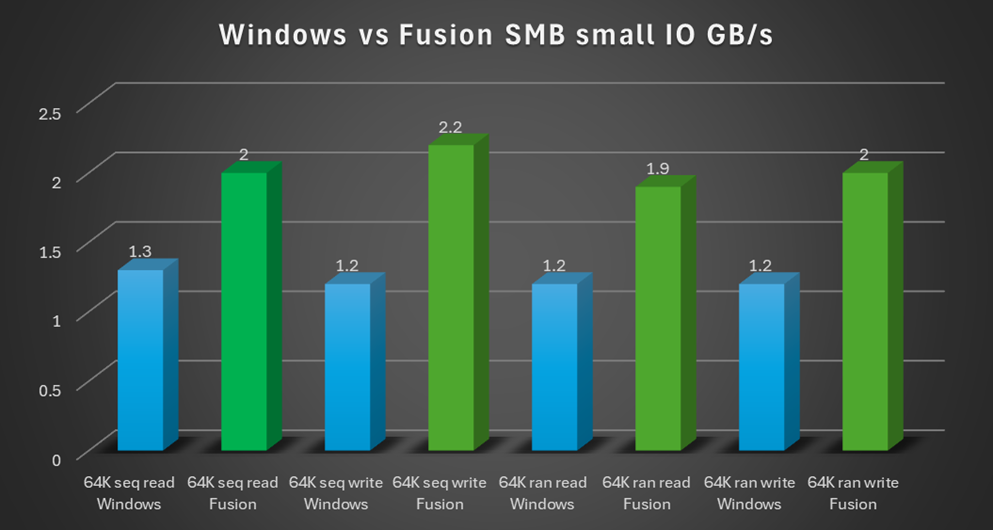
Here I am running FIO between a pair of Supermicro machines using RoCE RDMA and NVME drives, with the server dual-booting Ubuntu 24.04 and Windows Server 2025. I decided on two patterns – 1M and 64K – to give a feel for large and small IO workloads, with both sequential and random reads and writes.
The Linux + Fusion SMB server is running at ~22GB/s – that’s 33% faster than Windows Server 2025, with the same hardware, network, and Windows client! In fact, at 8M IO, the Fusion SMB server hits 24.4GB/s; the maximum RDMA speed on my test network is 25GB/s, we’re nearly at the line rate.
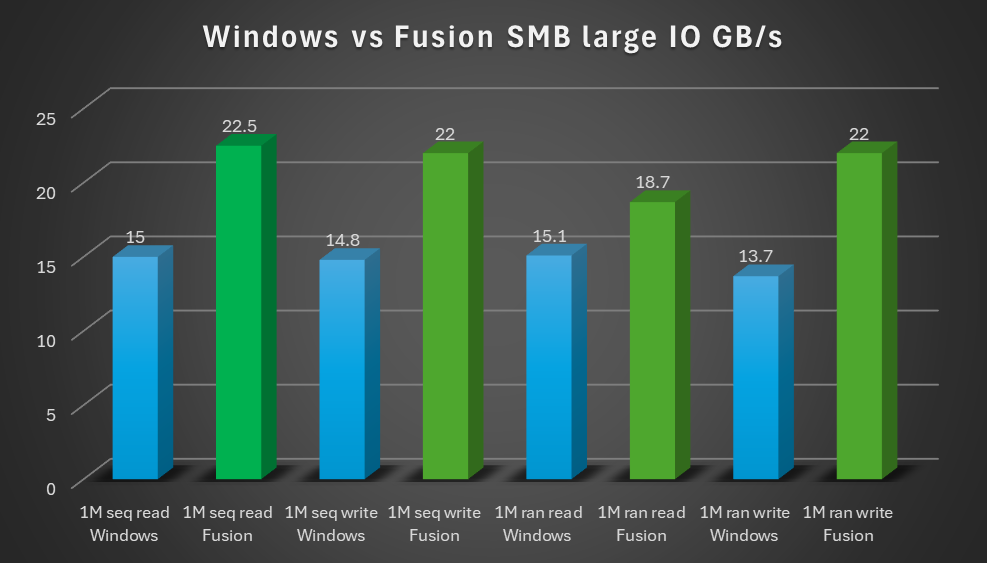
When we switch to 64K small IOs, the FIO application itself isn’t sending enough data to saturate the network or storage. Even so, the Fusion and Linux stacks’ much lower latency means SMB from a Windows client to the Fusion server is 30-45% faster than to a Windows Server.
The story is the same with IOPS and average latency: Fusion and Linux perform far better, and that increase in performance is productivity.
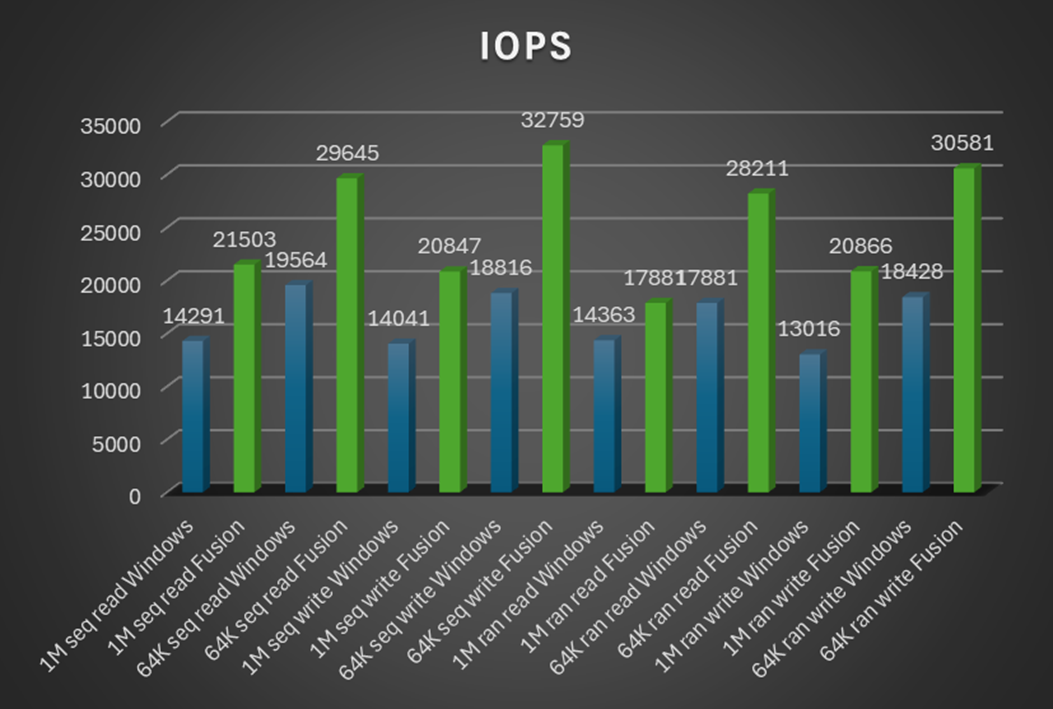
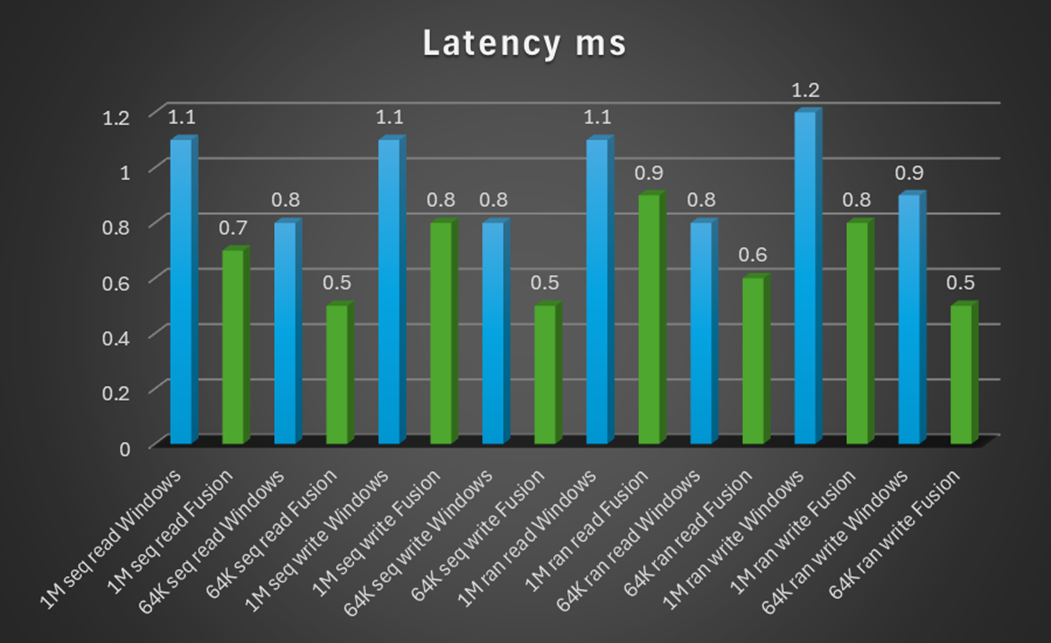
It’s not fair to lay all the blame on the SMB server here in Windows, it’s highly tuned and running flat-out as a driver. But the rest of Windows – the kernel, file system filters, anti-virus, etc. – all add unavoidable bottlenecks that lower the SMB server’s ultimate performance.
While NTFS has a solid set of features, it’s not as fast as many Linux file systems. There are endless open source and commercial options for high speed file systems and storage arrays, and Tuxera partners like IBM, WEKA, Quantum, and Xinnor have been honing them for decades.
So, let’s take the same tests above without SMB and compare 3rd generation XFS and NTFS 3.1 (LFS 2.0) local performance:
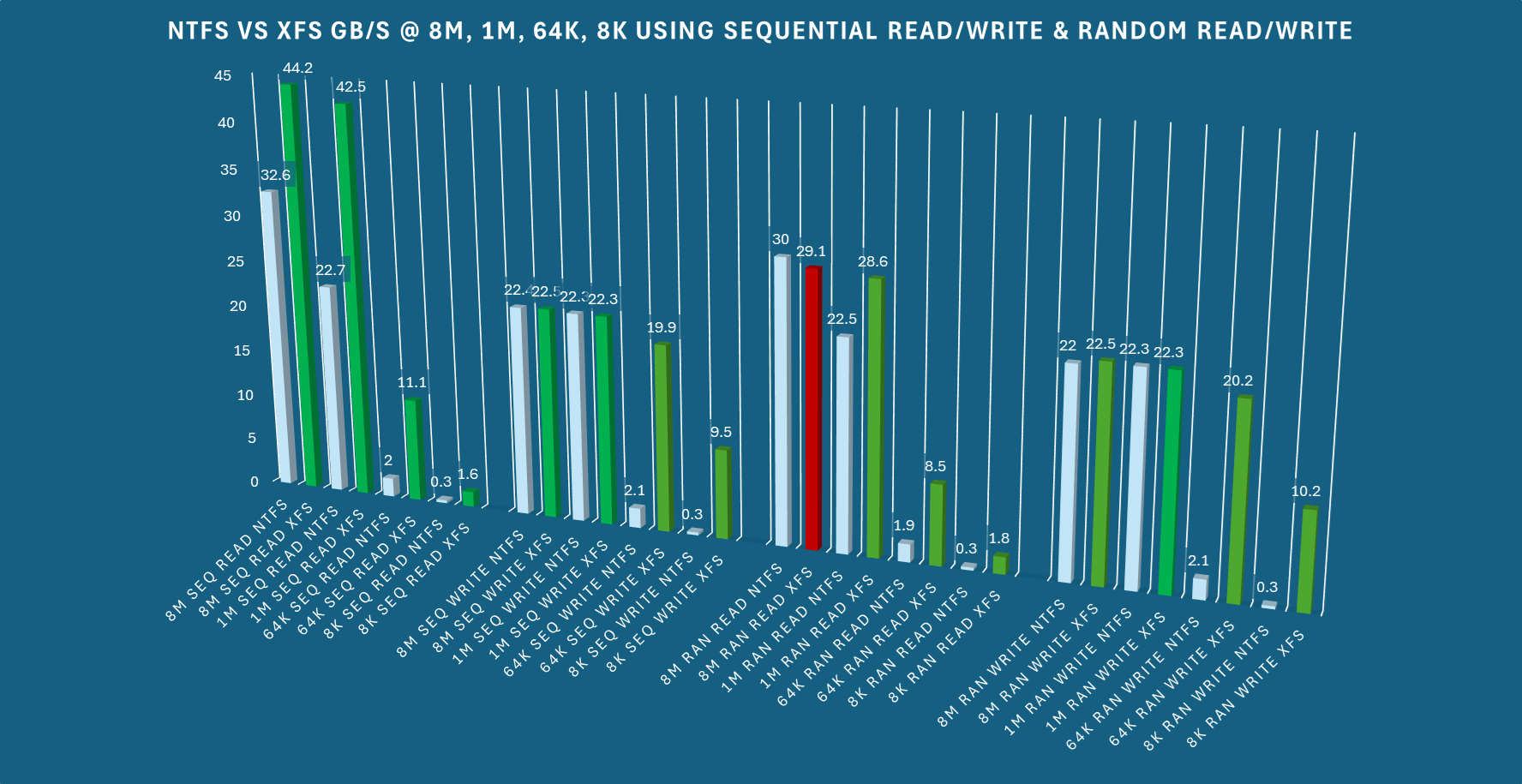
GB/s, IOPS, and latency are nearly always better with XFS. That’s quite a difference made just by changing file systems! Naturally, these are not absolute numbers – for instance, this Intel VROC 8xNVME RAID appears to max out writes at ~22.5GB/s; it’s certainly possible for both file systems to do better.
Fusion SMB and Windows Server both support Active Directory, Kerberos, NTLM, signing, encryption, SIDs, Windows ACLs, Windows groups, and auditing. Fusion even supports Windows privileges and, in a coming update, outputting audit events as Windows event log XML!
But Fusion takes security even further: you can use POSIX security for UNIX clients, LDAP ID mapping for Linux and MacOS, even Apple Open Directory. You can combine these options into hybrid modes forheterogenous environments. You can apply host-based access control and veto files to further restrict which clients can connect to the server or see certain files; neither option is part of SMB server in Windows. You can use an Access Based Enumeration system that works (do not enable this feature on Windows without extreme caution, trust me).
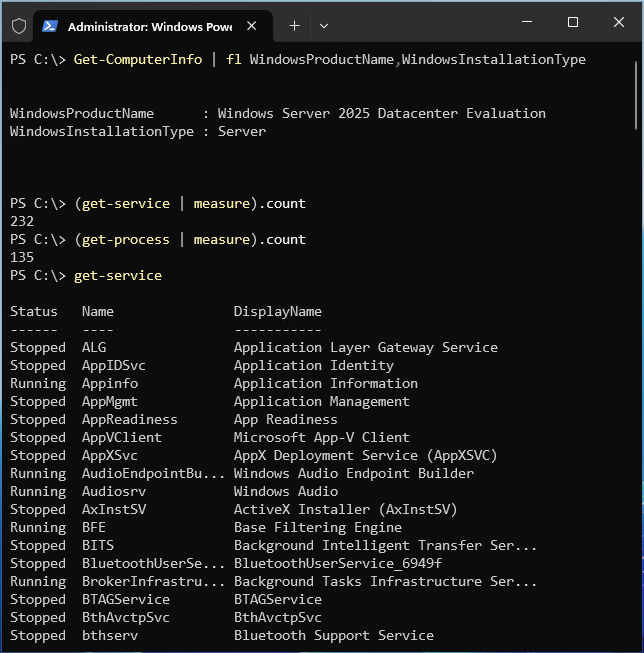
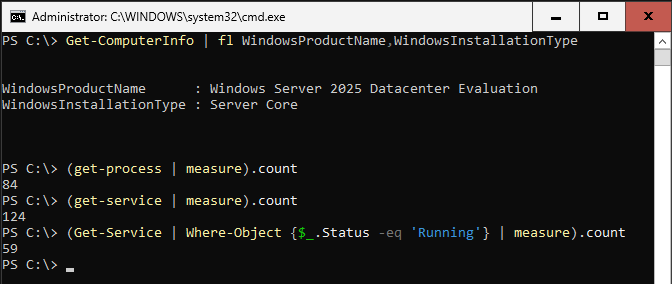
Furthermore, while Linux distros aren’t intrinsically more secure than Windows – they both have their fair share of CVEs and open source software isn’t immune to supply chain backdoors – there is the problem ofthe attack surface: even Windows Server in Core mode contains many components that aren’t necessary for a file server. That code creates a larger attack surface. Unlike Linux, Windows Server isn’t particularly modular. You can disable some elements, but the code lurks. Do I need all 232 services and 131 processes by default just to run my file server? No. Do I need audio, Bluetooth, and all these other services on my file server? Certainly not – they’re not helping users transfer data over SMB. You’ll still have to manage them, patch them, and protect them from attackers.
See for yourself:
If I look at my Core server instead of the full Desktop Mode above, where half the services and processes above aren’t installed, how many of those did I need to run for the SMB file server to work? None of them!Only 59 are potentially doing anything useful:
What matters most are the customer scenarios. As you’ve seen, Fusion SMB beats Windows Server in the common “Standalone SMB file server running in a VM” and “Scale-out cluster running in a rack” scenarios – but there are more.
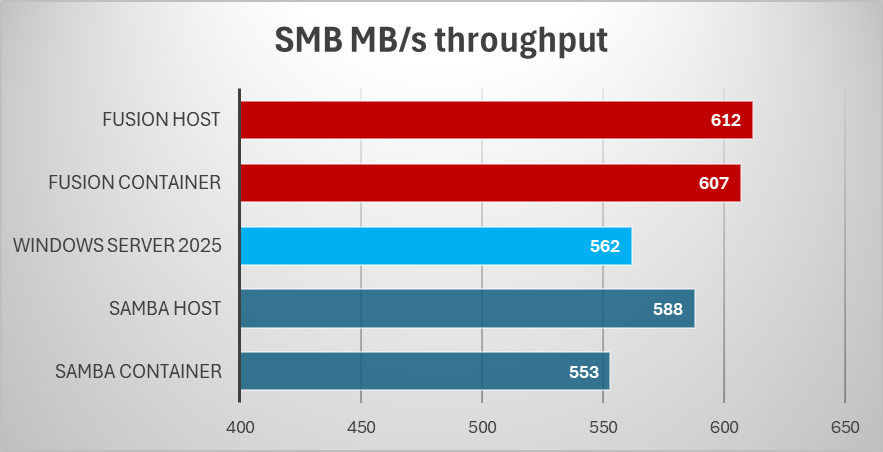
Last year I wrote how Containers and Kubernetes are best with Tuxera Fusion. It’s mainly about comparing Fusion and other Linux SMB servers like Samba, because you cannot run an SMB server in a Windows container. There’s no compromise on features or performance, though, a Fusion SMB container runs better than a full-blown Windows Server VM. From that container article, where I just measure single-threaded file copy performance over TCP:
Fortunately for Microsoft shops, you can at least use Azure Files as a storage point with your Windows containers running as SMB clients. Only as clients.
Every Cloud Service Provider understands that the operational & licensing costs of Windows is much higher than Linux. It’s why most utility VMs run Linux, why Microsoft Azure runs more Linux than Windows VMs, why AWS charges customers 4 times the price for a Windows EC 2 instance with 1 core and 2GB of memory than the same one with Linux. A VM that will run Fusion SMB very well on Linux but barely meets the bootup requirements for Windows Server.
Fusion runs well in the smallest VMs, and that increased VM density lowers CSP costs when offering up PaaS. Add the containers story to that and you have a recipe for competitive margins against the hyperscalers when you build your managed file server PaaS offerings.
In the world of embedded systems and Internet of Things, Linux is king; Microsoft surrendered that battle years ago with the death of Windows CE and Windows IoT Enterprise is just a license, not an operating system. With its low resource usage and network features like SMB over QUIC and SMB compression, Fusion SMB brings the capabilities of Windows to places where Windows cannot run.
Tuxera has decades of experience in embedded systems, where our file systems and flash controllers are used in the automative, aerospace, smart energy, defense, and medical industries; we have software in the Mars Rover, the International Space Station, and the Puli Lunar Water Snooper. Small footprint, mission critical software is what we do.
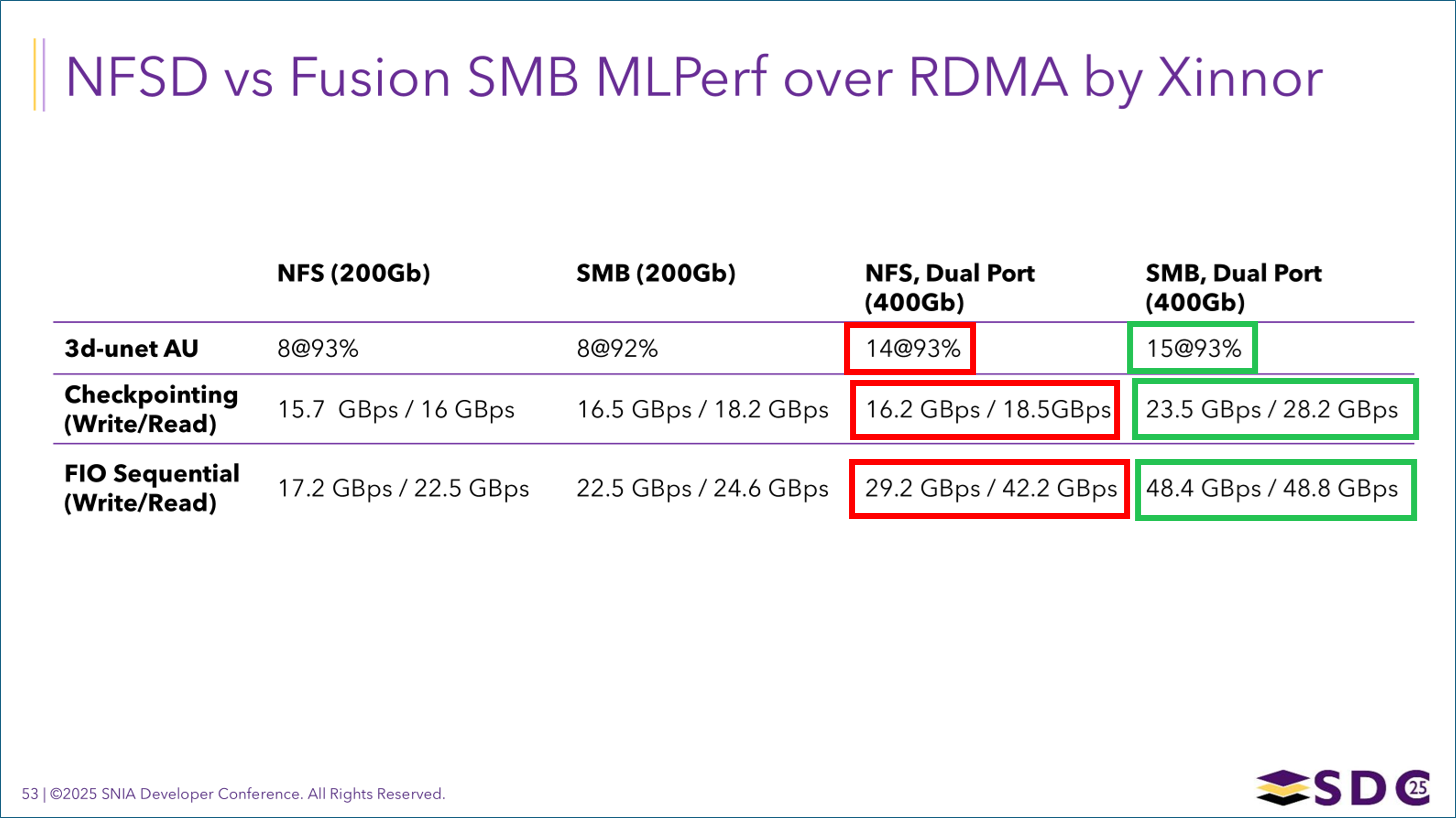
Microsoft may have started the book on SMB with Windows, but Tuxera and Linux have written all the recent chapters. For scale, performance, security, and customer scenarios, Fusion SMB and Linux are an unbeatable combination for your storage needs. includes Linux-to-Linux SMB for things like machine learning, where SMB outperforms NFS.
Yes, you read that right: Fusion SMB is faster than kernel NFSD in MLPerf benchmarks:
To see for yourself, visit https://docs.tuxera.com/ and click on Download Fusion Evaluation for a 45-day fully functional trial.
Ned Pyle
Enterprise Storage Technical Officer, Tuxera
(And 20 year Microsoft veteran)
RELATED ARTICLES

Heya folks, it’s Ned Pyle again. Let’s talk about how Tuxera Fusion SMB stacks up to its Linux community alternative, Samba....

Why media workflows demand a new approach to file sharing The media and entertainment industry stands at a technological crossroads....

How collaboration with industry leaders is transforming media storage performance Following our award-winning presence at NAB Show 2025, where Tuxera...

If you’ve run the SMB protocol, my name may be familiar. Every Microsoft document you read, every announcement you saw,...
Suggested content for: